What Is a Credit Card Reporting Date? How Statement Closing Dates Affect Your Credit Score
February 10, 2026 6:54 pm Leave your thoughtsSummary:
- Credit card reporting is based on your statement closing date (the “snapshot day”), not your payment due date, so your balance on that date is what typically gets reported to the credit bureaus and can affect your score.
- The key score factor is credit utilization (reported balance ÷ credit limit); even if you pay in full by the due date, a high statement balance can temporarily lower your score.
- To manage this, find your statement closing date on your statement/app and pay down your balance a few days before it closes, so a lower balance gets reported while you can still pay the full statement by the due date to avoid interest.
Have you ever paid your credit card bill on time, only to see your credit score drop? This frustrating mystery often comes down to a date you might be ignoring: the statement closing date. This is the day your card issuer takes a “snapshot” of your account balance and reports it to the major credit bureaus.
Even if you pay the bill in full by the due date, a high balance on that snapshot day can make it seem like you’re using too much credit, causing your score to dip. By understanding this timing, you can take control and manage your balance on the right day to help maximize your credit score.
Statement Closing Date vs. Payment Due Date: The One-Two Punch of Your Billing Cycle
You almost certainly know your Payment Due Date. It’s the final deadline plastered on your bill: the last day to pay without getting hit with a late fee. However, a more powerful date hiding in plain sight on your statement has a bigger impact on your credit score: the Statement Closing Date.
Think of your Statement Closing Date as “snapshot day.” On this day each month, your credit card company takes a picture of your account. The balance at that moment is what they put on your monthly bill and, more importantly, report to credit bureaus like Experian, Equifax, and TransUnion.
The crucial difference is timing. Your statement may close on the 20th of the month, reflecting your balance as of that date. Your actual payment for that bill isn’t due until about three weeks later, perhaps on the 15th of the next month. This gap means your credit score is based on the snapshot taken on the 20th, not on the payment you make weeks later.
This is why you might pay your bill in full every month and still see your score dip. If you make a large purchase, the high balance is captured and reported, even if you pay it off before the due date. This reported balance is used to calculate a key percentage that lenders closely monitor.
What is Credit Utilization and Why Does It Matter So Much?
That closely-watched percentage is your credit utilization. It’s simply the amount of credit you’re using compared to your total credit limit. This number is calculated using the Reported Balance—the amount from that “snapshot” taken on your Statement Closing Date. It’s one of the most significant factors influencing your credit score because it gives lenders a quick glimpse into how you manage your debt.
Calculating your utilization is straightforward: divide your reported balance by your total credit limit. For example, if your credit card company reports a $300 balance and your limit is $1,000, your utilization is 30%.
- Reported Balance: $300
- Credit Limit: $1,000
- Credit Utilization: ($300 / $1,000) = 30%
From a lender’s perspective, a high utilization rate (e.g., 80%-90%) can be a red flag, suggesting a person may be overreliant on credit. In contrast, having a plan to lower credit utilization indicates you have ample available credit and don’t need to use it so much. While there’s no magic number, many financial experts recommend keeping your credit utilization below 30% to maintain a healthy credit score.
Since the balance on your statement closing date is what gets reported, you can directly control your utilization by paying down your balance before that snapshot is taken. This simple timing strategy puts the power back in your hands.
💡RELATED: 5 Ways to Increase Your Credit Limit in a Short Amount of Time
How to Find Your Statement Closing Date
Finding your Statement Closing Date is simple. Your credit card company prints it right at the top of every monthly statement. Grab your latest paper or PDF statement and look near your name and account number. You will see two key dates listed: the Payment Due Date you already know, and the Statement Closing Date. This is the “snapshot” date.
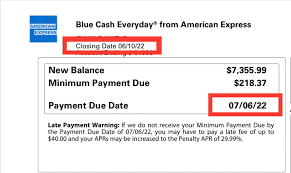
If you don’t have a statement handy, you can also find this information by logging in to your credit card account on your credit card issuer’s website or mobile app. Look for sections labeled “Account Details” or “Statement Info,” or view your most recent statement online. Taking a moment to check this for each of your cards is a crucial step in managing your credit utilization.
Current Balance vs. Statement Balance: Why Your App Can Be Misleading
When you open your credit card app, the big number you see at the top is your Current Balance. Think of it as a live, running tab of everything you’ve charged up to that very second. This number changes with every purchase you make.
Your Statement Balance, on the other hand, is a fixed amount from the past. It’s the total you owed on the exact day your statement closed. This is the number that appears on your monthly bill, and it’s the only number your card issuer reports to the major credit bureaus (like Experian and TransUnion) for that month.
This distinction is exactly why your credit score can be impacted in ways that feel unfair. Let’s say you charge an expensive item, bringing your current balance to $800 on a $1,000 limit card. If your statement closes the next day, your reported statement balance will be $800. That’s an 80% credit utilization rate that locks in for the month, even if you plan to pay the full amount by the due date.
The balance you see in your app today isn’t what’s on your credit report yet. It’s a preview of what could be reported if your statement were closed right now. This gives you a monthly window to reduce that number before the snapshot is taken.
How to Lower Your Balance BEFORE It’s Reported
The most effective strategy for managing your credit score month-to-month is to make a payment before your statement closes. This simple act directly lowers the balance in that all-important “snapshot” sent to the credit bureaus.
For example, imagine you spend $800 on a credit card with a $1,000 credit limit. If you wait for your bill to arrive and then pay it, your statement will close with an $800 balance. The credit bureaus will be told you are using 80% of your available credit—a high number that can temporarily lower your score.
Now, let’s apply the strategy. You still spend the same $800. But this time, a few days before your statement closing date, you log in and pay off $700. When the snapshot is taken, your balance is only $100. Suddenly, your reported credit utilization plummets from a scary 80% to a healthy 10%, all because you timed your payment differently.
This isn’t about spending less; it’s about paying smarter. By paying down your balance before it’s officially recorded, you take control of the story your credit report tells. This is especially useful in the months leading up to a major loan application for a car or home.
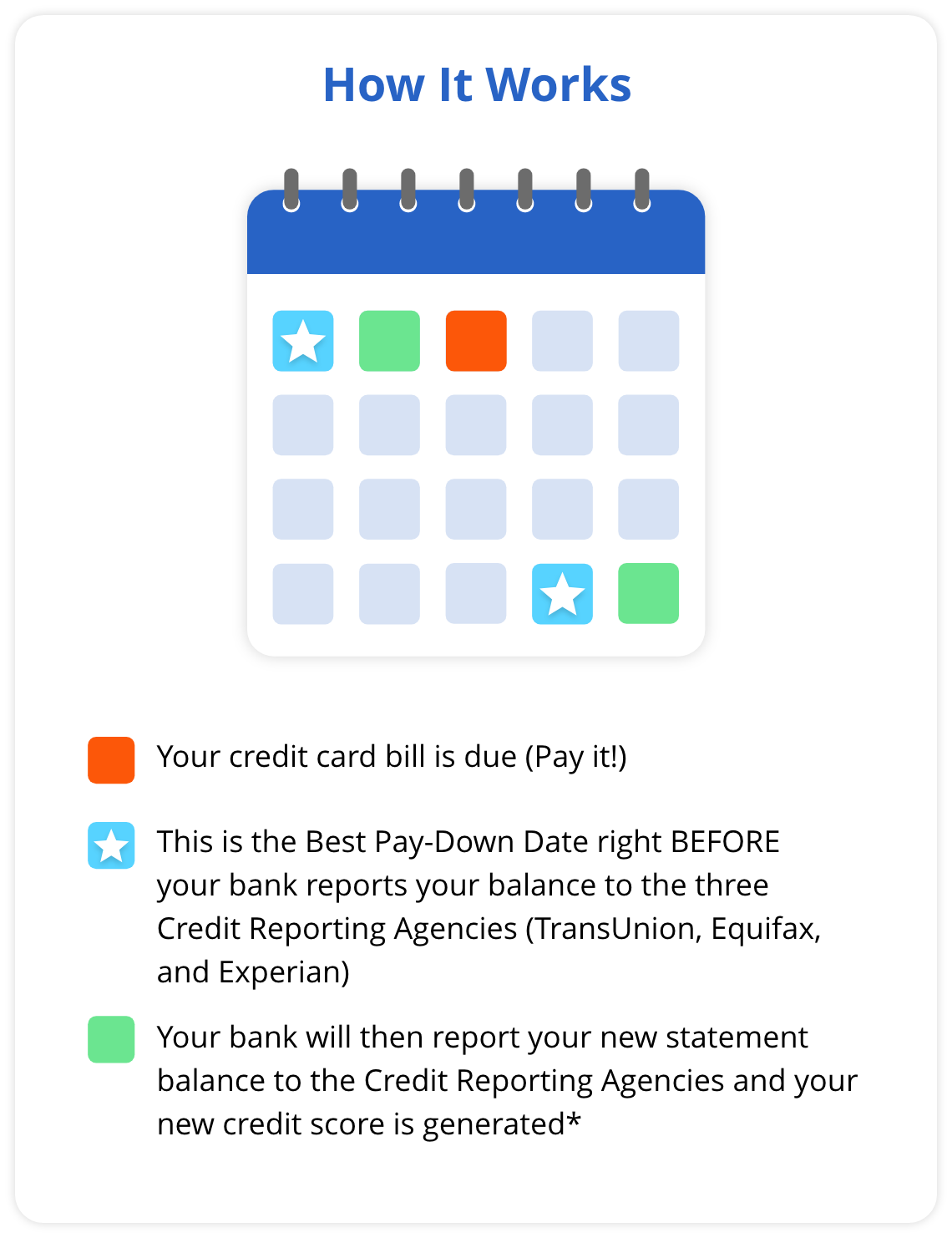
💡What is a Best-Pay-Down Date?
“I Paid It Off! Why Is My Reported Balance Still So High?” (And Other Common Questions)
It’s frustrating to pay off a big balance, only to check your credit report and see the high number still sitting there. The answer almost always comes down to timing. If you paid your bill after your statement’s closing date, the high balance was already captured and reported for the month.
Here are answers to a few other key questions:
- How often do credit cards report? Usually, just once a month. Your card issuer reports the balance from your statement closing date, and that’s the only update the credit bureaus receive from them for that cycle.
- Do I need to carry a balance and pay interest? Absolutely not. This is a stubborn myth. You can have a low reported balance on your score and still pay your statement balance in full before the due date to avoid paying any interest.
- Why isn’t my credit report updated instantly? After your card company sends the update, the credit bureaus need time to process it. It may take several days, or even a week, for the new, lower balance to appear on your report.
Remember that your credit report is a monthly snapshot, not a real-time feed. A high reported balance from last month doesn’t mean you’re doing anything wrong; the next report will reflect your good habits.
💡RELATED: 4 Things You Need to Know About Prepayment Penalties
A Quick Look at Major Credit Card Issuers’ Reporting Habits
The “statement closing date” strategy works for the vast majority of major credit card issuers, including Chase, American Express, Capital One, and Citi. The standard industry practice is to report the balance that appears on your monthly statement. This creates a predictable reporting schedule across the financial world.
This approach is efficient for banks, as they calculate your balance once for your bill and use that same number for your credit report. While this rule is incredibly consistent, you should always treat your own statement as the ultimate source of truth. The date printed at the top of your bill is the one that directly impacts your credit utilization.
Your 3-Step Action Plan to Take Control of Your Credit Score
By using the “snapshot” taken on your statement closing date, you can directly influence your reported balance. Here’s a simple action plan to take control.
Your 3-Step Action Plan:
- Find Your Statement Closing Date on your monthly statement and mark your calendar.
- Check Your Balance in your app or online a few days before this date.
- Make a Payment to reduce your balance before the “snapshot” is taken.
Each month is a new opportunity to decide which balance to report, transforming a simple date on a calendar into a powerful tool for building your financial health.
Tags: credit card statementCategorised in: Credit Cards, Credit for Beginners, Credit Report, Credit Score
This post was written by Staff Writer